Overview
End-to-end claims management, reimagined for mobile.
ClaimsPro is a mobile-first claims handling application designed to serve both US insurance policyholders and adjusters — consolidating the entire claims lifecycle into a single, intuitive mobile experience.
I led end-to-end UI/UX design across all 23 screens in Figma Make, building a full component library and a custom brand system from scratch — balancing enterprise-grade compliance requirements with consumer-grade usability.
The Problem
Insurance claims are broken for everyone.
Filing an insurance claim in the US is one of the most stressful, paper-heavy, and opaque experiences a policyholder can face. Adjusters aren't faring better — juggling legacy systems, email chains, and manual workflows.
📄 Paper-Heavy Processes
Most US insurers still rely on faxes, PDFs, and phone calls. No unified mobile experience exists for filing or tracking claims.
⏳ Slow Resolution Times
Average auto claim takes 30+ days. Policyholders receive little to no real-time updates, causing anxiety and repeated contact attempts.
🔒 Compliance Complexity
US insurance is state-regulated. Each state has unique requirements for denial notices, e-signatures, and data retention — creating compliance risk.
Design Goals
What we set out to solve.
ClaimsPro was designed to be the single mobile source of truth for the US insurance claims lifecycle — for both the policyholder and the adjuster.
⚡ Reduce Filing Friction
A guided 5-step claim form with smart defaults, policy lookup, and inline validation to get first submissions right the first time.
🔍 Radical Transparency
Real-time status updates, communication threads, and a visual timeline so policyholders always know exactly where their claim stands.
🛡 Compliance by Design
HIPAA-aware flows, ESIGN Act compliant e-signatures, state-specific denial notices, and full audit logs built into every critical screen.
📱 Mobile-First, Always
Designed for thumbs: bottom navigation, bottom sheets, FAB shortcuts, and swipe gestures that feel native on iOS and Android.
User Flow
End-to-end journey, mapped.
Every screen was designed as part of a coherent user flow — from first launch to claim resolution. No dead ends, no confusion.
Screen Highlights
Every screen, by design.
A deep dive into the core screens of ClaimsPro — designed to balance enterprise functionality with consumer-grade simplicity.
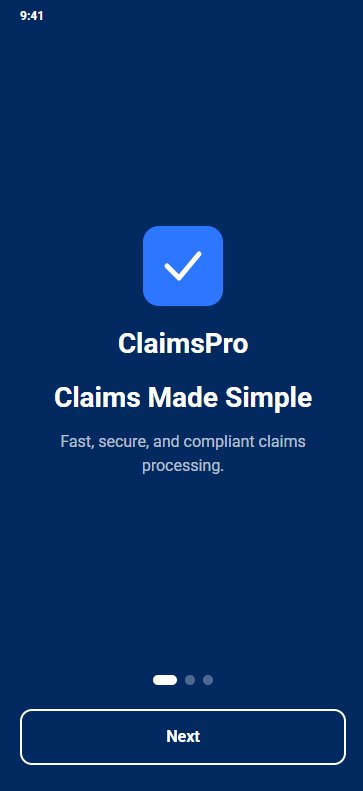
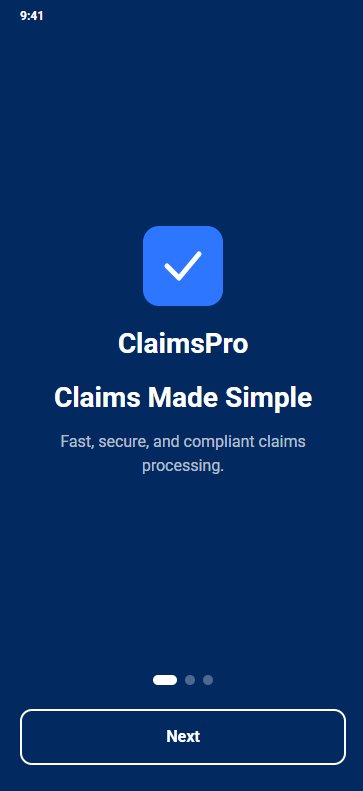
Splash & first impression
Clean, confident entry point. The ClaimsPro brand identity lands immediately — trust-first before a single field is filled.
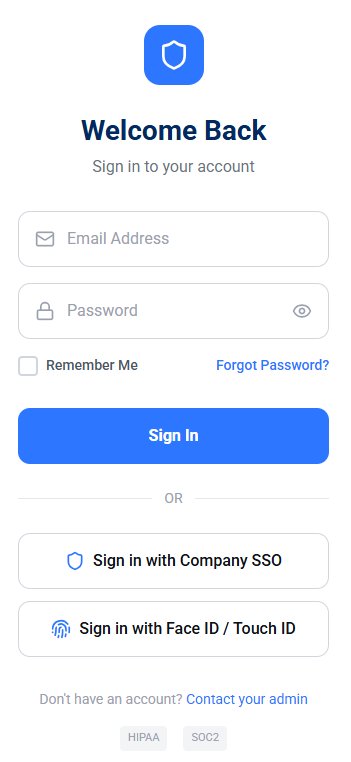
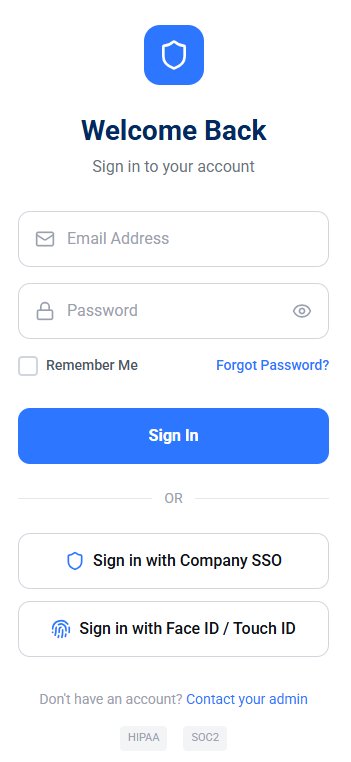
Secure sign-in with SSO & biometrics
Email/password, Company SSO, and Face ID / Touch ID — HIPAA and SOC 2 compliance badges visible at the point of login.
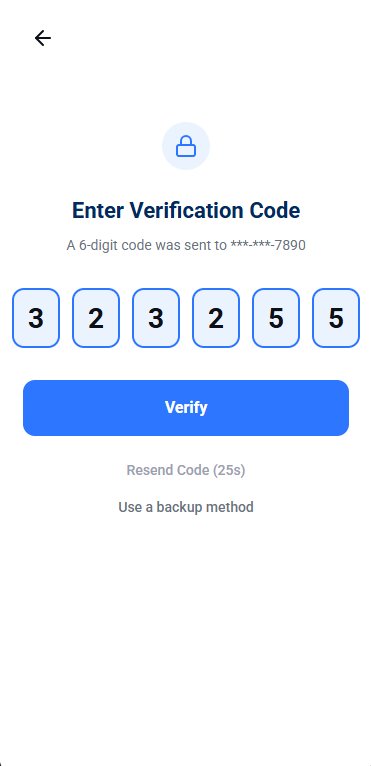
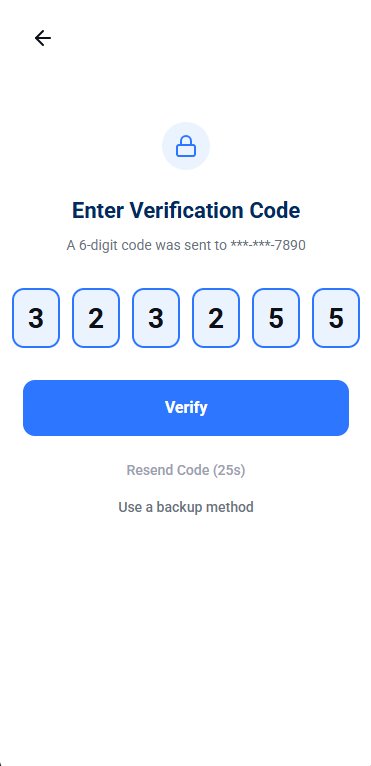
6-digit OTP verification
Enforced 2FA for all adjuster accounts. Resend timer, backup method fallback, and biometric re-auth after session expiry.
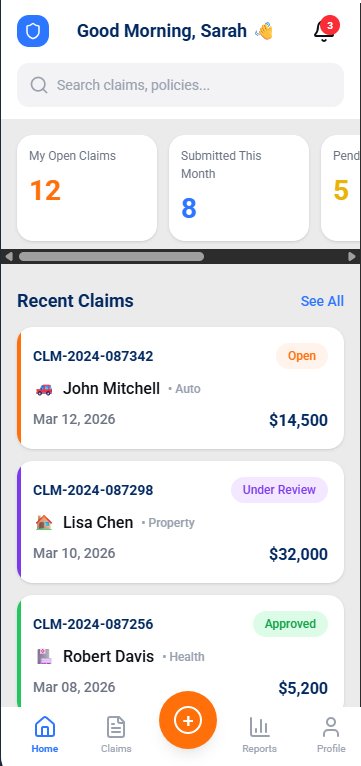
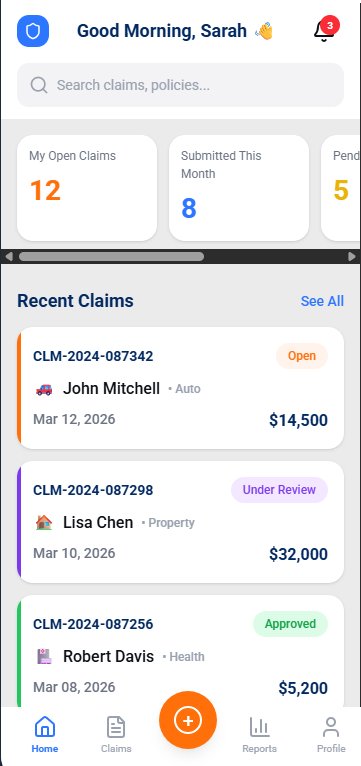
Command center — at a glance, nothing missed.
Summary KPI cards, recent claims list with inline status badges, and a central FAB for filing a new claim. Personalized greeting with role-aware content and a notification bell with unread count.
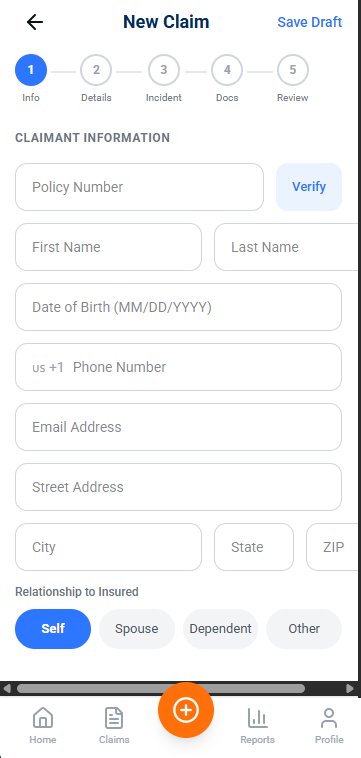
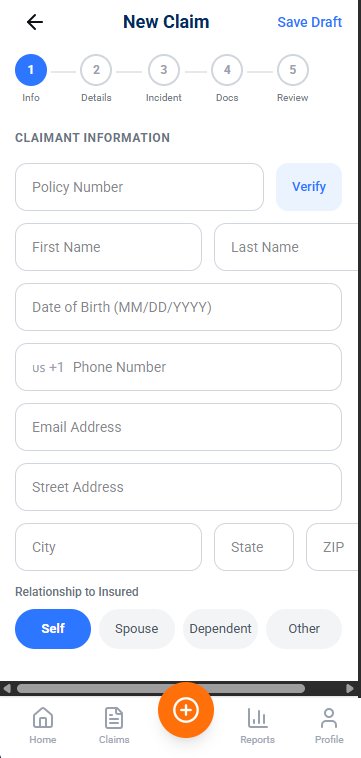
A guided five-step form that gets it right first time.
Stepped wizard with inline validation and smart defaults. Policy lookup auto-fills covered details. Step 5 includes an ESIGN-compliant e-signature field before submission.
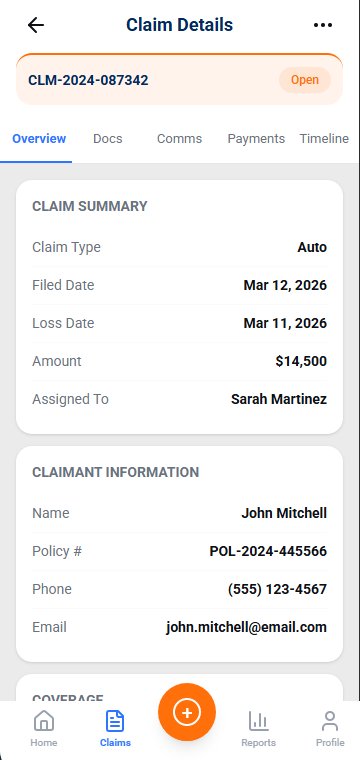
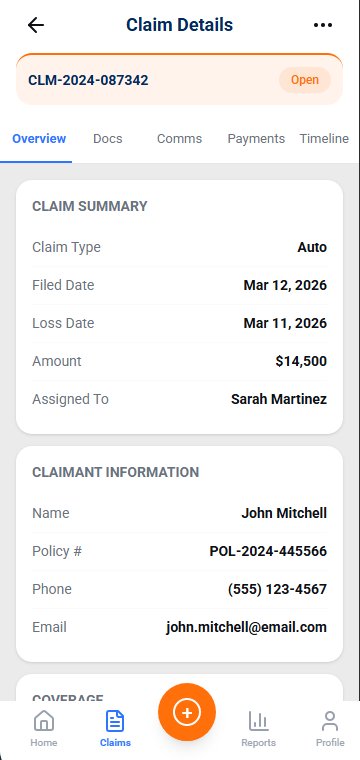
Full claim view with tabbed detail
Overview, Docs, Comms, Payments, and Timeline tabs — every piece of claim data accessible in a single screen without drilling deeper.
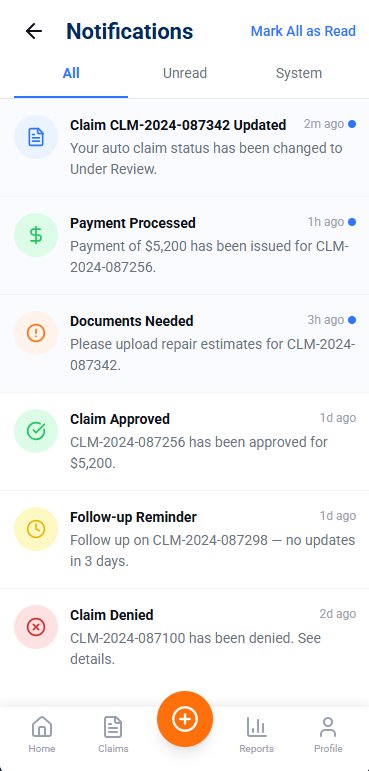
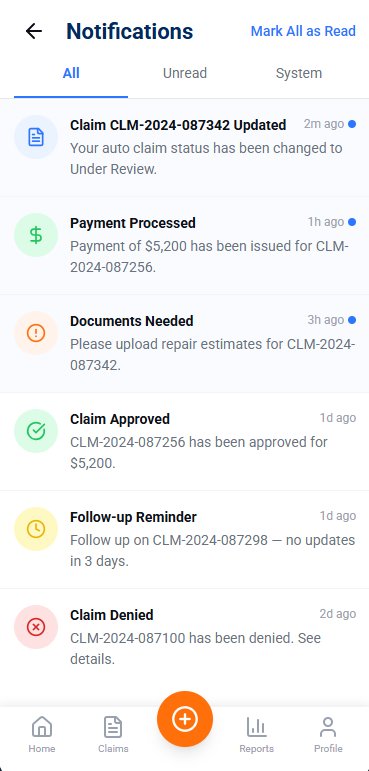
Every update, instantly actionable.
Color-coded by type, relative timestamps, unread dot indicators, and Mark All as Read. All / Unread / System tabs keep the inbox clean.
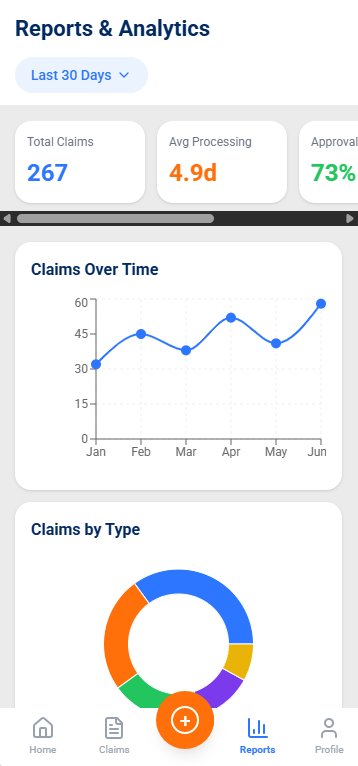
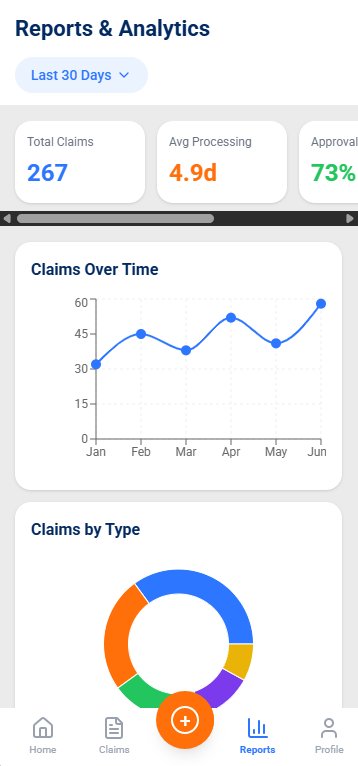
Data-driven oversight for adjusters.
Total claims, avg processing time, and approval rate at a glance. Claims Over Time line chart and Claims by Type donut with date-range filter.
Design System
Built on a consistent foundation.
Every color, typographic choice, and spacing decision was systematized into reusable tokens — ensuring visual consistency across all 23 screens and the full component library.
Color Palette
#2E78F5
#1A55B8
#042D6B
#F5650A
#EBEBEB
#FFFFFF
Typography — Roboto
Status System
Mobile-Native Patterns
US Compliance
Designed for the US regulatory landscape.
Insurance in the United States is uniquely complex — governed at the state level with federal overlays. ClaimsPro bakes compliance into the design, not just the backend.
HIPAA Awareness
Health claim flows include explicit PHI handling notices. Medical records upload is segregated and labeled with sensitivity indicators throughout the UI.
ESIGN Act — E-Signatures
The Review & Submit screen includes a finger-draw or type-name e-signature field compliant with the Electronic Signatures in Global and National Commerce Act (2000).
State Denial Notices
The Deny Claim bottom sheet includes a dynamic regulatory notice that adapts per jurisdiction — per [State] law requirements.
Full Audit Trail
Every action — status change, document upload, message sent, payment issued — is logged with timestamp, user, field changed, and old/new values.
Two-Factor Authentication
2FA enabled by default for all adjuster accounts, with 6-digit OTP, biometric fallback, and forced re-authentication after session expiry.
SOC 2 Ready UI Signals
Login screen displays SOC 2 and HIPAA compliance badges. The compliance tab in settings shows state-by-state checklist and data retention policies.
Key Takeaways
What this project taught.
Designing for a regulated, high-stakes industry demanded discipline — every UX decision had to balance speed, clarity, and trust simultaneously.
Trust is a design material.
In insurance, users are filing claims during the worst moments of their lives — after accidents, floods, health crises. Every label, button color, and error message either builds or erodes trust. Conservative, clear language won over clever copy every time.
Compliance shapes UX, not blocks it.
Regulatory requirements like state-specific denial notices and e-signature mandates initially seemed like design constraints. Treating them as first-class UX elements — surfaced clearly to users rather than hidden in fine print — actually improved the experience.
Dual-user products need two mental models.
ClaimsPro serves both policyholders (emotional, infrequent users) and adjusters (power users, frequent workflows). Designing screens that serve both audiences without compromising either required constant role-switching during review.